Monthly budgets split by category
Enter your income, give each category an amount, and check each one against the day of the month as you spend.
See Ibils plans60% of $600
Spending faster than planned
Give every category its own amount
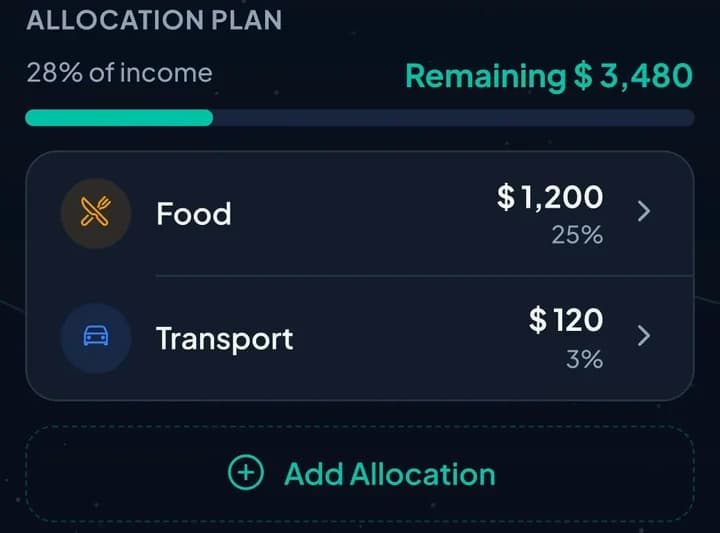
Type your income, then add an amount for each category. Remaining drops as you go.
Monthly, or for one trip
A custom budget gets its own name, like Vacation, and its own amounts.
Start next month from this one
Tap Copy from last month and change only what moved.
Name
November 2026
Common questions
How do I make a monthly budget?
Tap Set Budget on Home, or open Budgets, tap + and choose Monthly Budget. Pick the month, type your income, add an allocation for each category and save.
Does Ibils connect to my bank?
No. It doesn't log in to your bank. Spending comes from what you type, scan, say to the assistant or import from an Excel or CSV file.
What happens if I go over a category's budget?
Nothing is blocked. The category shows how far over the limit you are. If another category has used less than half of its amount, Ibils suggests moving money from it.
Can I move money between categories?
Yes. When one category runs ahead and another has used less than half of its amount, Budgets suggests a move. Tap Move it, or Not now to hide it for that category this month.
Can I budget for a trip or an event?
Yes. Choose Custom Budget, give it a name such as Vacation, enter what you expect to spend and split it across allocations.
Is budgeting in Ibils free?
Yes, budgets aren't a Premium feature. Setting a budget by chat and the AI Assistant itself need Premium Pro or Premium MAX.