How to set up a monthly budget
Give each category part of your take-home pay, then watch what you spend against it.
 Ibils teamUpdated 2 min read
60% of $600
Spending faster than planned
Step 1: Pick a starting split
Use the 50/30/20 calculator for a first draft, then adjust it to your life.
/month$2,400Needs 50%Rent, groceries, minimum debt payments$1,440Wants 30%Dining out, streaming, upgrades$960Savings 20%Savings, debt paid above the minimumStep 2: Open the budget form
Tap Set Budget on Home, or + in Budgets, and choose Monthly Budget.
Step 3: Enter income, allocate and save
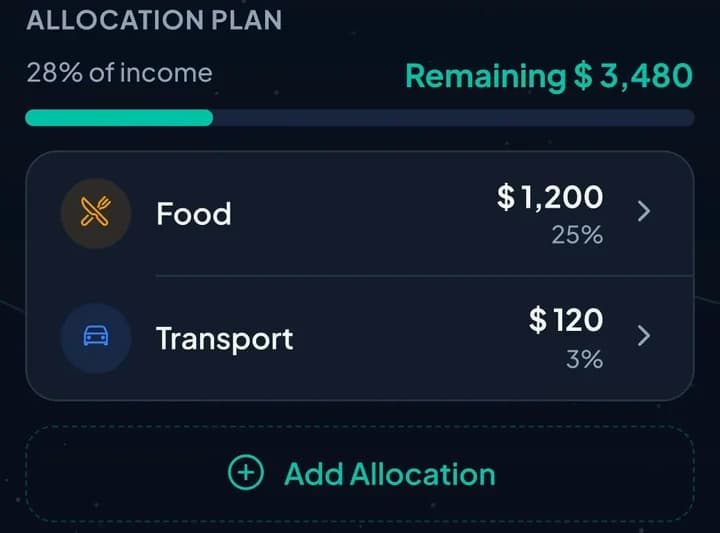
Type your income, add an allocation per category, then save when Remaining looks right.
Step 4: Log spending against it
Type, scan or message each expense. The reply shows the category total.
IbilsStarbucks 5.40 on Visa
yes
Starbucks $5.40 saved as Food from Visa card, today.
Food this month: $186.40 of your $1,200.00 budget.
Send /undo within five minutes to reverse it.
Step 5: Copy it next month
Start next month's budget, tap Copy from last month, and change what moved.
New budgetCopy from last monthName
November 2026
Limits
- Up to your income
A budget can't add up to more than your income, and each category appears once. One budget per month.
- No bank login
Spent counts what you type, scan, say to the assistant or import from Excel or CSV.
Common questions
How do I make a monthly budget from scratch?
Write down your take-home pay, list your fixed bills, then add the spending you can adjust. Make the amounts add up to no more than your income. In Ibils, enter the income and add one allocation per category.
How much of my income should go to each category?
There's no single right split. The 50/30/20 rule is a common starting point: half to needs, 30% to wants, 20% to savings. Adjust it to your rent and your goals.
Do I need to budget every category?
No. Anything you don't assign shows as Left to allocate. Start with the bills that repeat, like rent and phone, then groceries, and add more later.
Can I budget a different amount each month?
Yes. Each month has its own budget. Copy from last month brings the categories over so you only change what's different.
What happens when I overspend a category?
Nothing is blocked. The category shows how far over you are, and Ibils may suggest moving money from a category with room left.
Is the budget feature free in Ibils?
Yes, budgets aren't a Premium feature. Setting a budget by chat and the AI Assistant need Premium Pro or Premium MAX.