Scan receipts to track expenses
Photograph up to five receipts and each one comes back as an expense you can check before saving.
See Ibils plans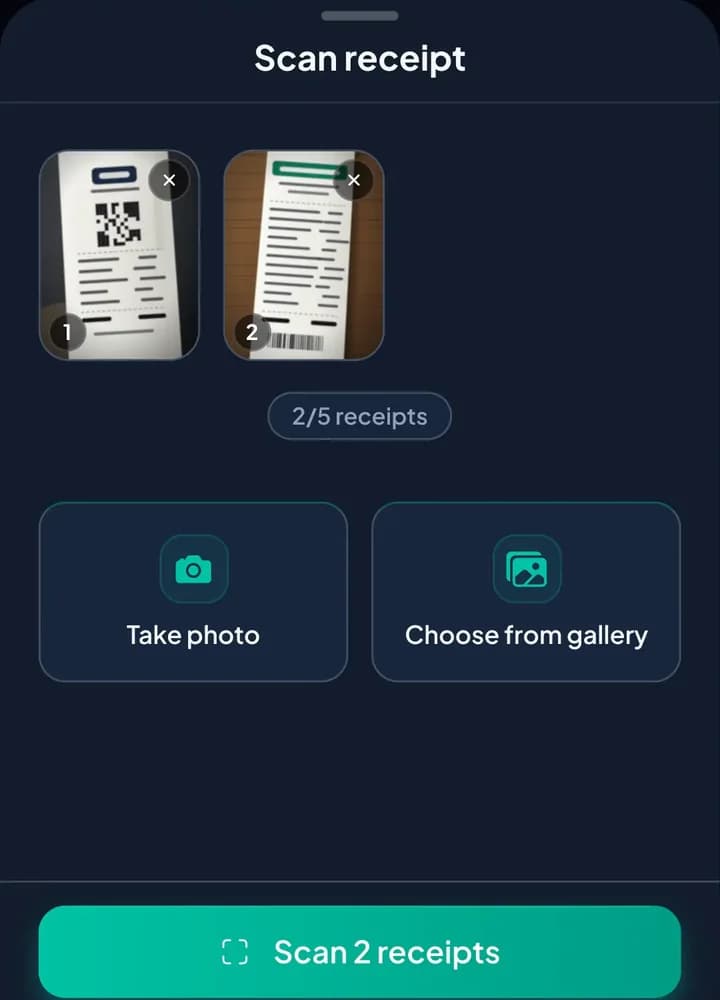
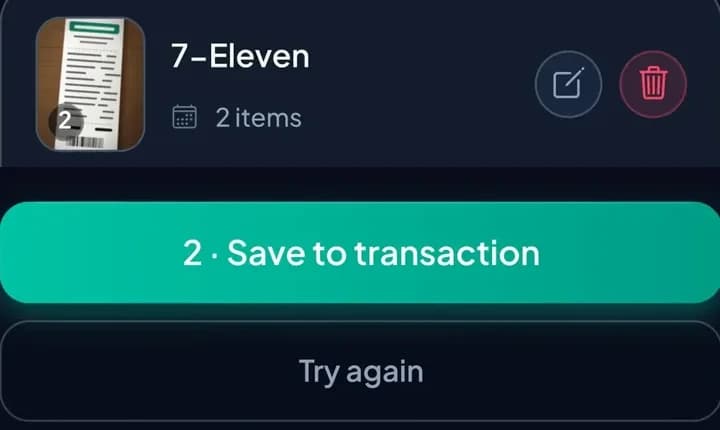
Each receipt becomes one card
Store, items and total land in one transaction. The line items go into the notes.
2 items
Edit or drop a card before saving
Tap the pencil to fix a card or the trash can to drop it. Nothing saves until you tap Save to transaction.
Which plans include it
Receipt scanning
- Free
- BasicPremium
- ProPremium
- MAXPremium
Limits
- Five receipts per scan
Scans count toward a monthly limit that resets each period.
- Dates are checked
A future date has to be fixed before you can save.
- A failed read is reported
Ibils tells you how many receipts in a batch it read and how many it couldn't.
Common questions
How do I scan a receipt to track expenses?
Open Receipt Scanner from Tools, tap Take photo or Choose from gallery, then tap Scan. Ibils shows a card with the store, the total and a category. Tap Save to transaction to add it to your spending.
Can I scan several receipts at once?
Yes, up to five per scan. Each receipt comes back as its own card, and one tap on Save to transaction saves them all.
Can I scan a photo I already took?
Yes. Tap Choose from gallery and pick the photo instead of taking a new one.
Is receipt scanning free?
No. It comes with Premium Basic, Premium Pro and Premium MAX. The Free plan doesn't include it.
What if the scan gets something wrong?
Nothing is saved until you tap Save to transaction. You can fix the merchant, total, category, account, date or notes first. In a batch, tap the pencil on a card to edit it, or the trash can to drop it. For a bad photo, tap Try again and retake it.
Can I undo a receipt I just saved?
For about eight seconds after saving, a message offers Undo. Tap it and the transactions are removed and your balance goes back. After that, delete the transaction from Transactions.